Linux
Install PortPilot on x86_64 systemd hosts, including headless servers, service control, upgrade, and uninstall.
Prerequisites
- x86_64 Linux with systemd
- Root (
sudo) to install - Outbound HTTPS to
https://api.portpilot.appif you will pair
There is no .deb, .rpm, AppImage, Flatpak, or Snap. The same install.sh is used on every distro we test: Ubuntu 24.04 (desktop and server), Debian 13, Fedora, and Arch.
If Download does not list Linux binaries yet, you must build them from the repository (cargo build --release for agent, helper, and CLI) before running install.sh.
Install
Copy the release binaries from Download onto the host, then:
sudo ./install.sh ./portpilot-agent ./portpilot-helper ./portpilotA fourth argument is the optional desktop app (GUI machines only).
Default PREFIX=/usr/local. The installer creates system user portpilot, data dir /var/lib/portpilot, env file /etc/portpilot/agent.env, enables portpilot-helper (if the helper binary was passed) and portpilot-agent, and installs /etc/profile.d/portpilot.sh so portpilot is on PATH.
Open a new shell, then:
portpilot --version
systemctl status portpilot-agent
portpilot pair
The agent keeps running after you disconnect. After reboot, systemd starts the services again.
Headless servers
No desktop environment is required.
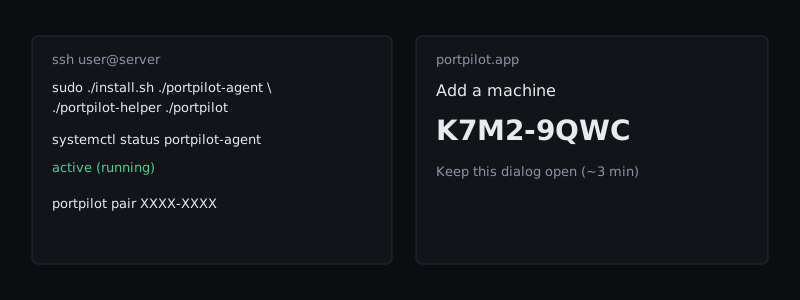
- SSH into the server.
- Install as above (omit the desktop binary).
systemctl status portpilot-agent— expectactive (running).- On your laptop, open https://portpilot.app → Machines → Add machine → Generate pairing code. Keep it visible.
- On the server:
portpilot pairand type the code, orportpilot pair XXXX-XXXX. - Confirm the machine is online in the dashboard.
If portpilot status cannot find the token, open a new SSH session or:
export PORTPILOT_DATA_DIR=/var/lib/portpilotsystemd
| Action | Command |
|---|---|
| Status | systemctl status portpilot-agent |
| Helper status | systemctl status portpilot-helper |
| Start | sudo systemctl start portpilot-agent |
| Stop | sudo systemctl stop portpilot-agent |
| Restart | sudo systemctl restart portpilot-agent |
| Enable on boot | sudo systemctl enable portpilot-agent (installer already does this) |
| Disable | sudo systemctl disable portpilot-agent |
| Logs | sudo journalctl -u portpilot-agent.service -n 80 --no-pager |
| Follow logs | sudo journalctl -u portpilot-agent.service -f |
Restarting the agent from Desktop as a normal user often fails (no polkit rule). Use sudo systemctl restart portpilot-agent on the host.
Upgrade
Run install.sh again with the new binaries. Data in /var/lib/portpilot is kept. /etc/portpilot/agent.env is not overwritten if it already exists.
Uninstall
sudo ./uninstall.shStops services and removes binaries. Keeps /var/lib/portpilot.
sudo PURGE_DATA=1 ./uninstall.shAlso deletes data, /etc/portpilot, and the portpilot user.
Expected result
Active: active (running) for portpilot-agent; portpilot status in a new shell; pairing succeeds while the dashboard code is still valid.
Common problems
| Symptom | Cause | Resolution |
|---|---|---|
| CLI not found | Same SSH session as install | New login, or export PATH=/usr/local/bin:$PATH |
| Agent inactive | Binary arch, hardening, data dir | journalctl -u portpilot-agent.service -n 80; confirm x86_64 |
| Docker empty | Agent user cannot use the engine socket | Ports still list; add the portpilot user to the docker group only if you accept that risk |
| Firewall mutate fails | Not UFW (common on Fedora/firewalld) | Inspect still works; mutate needs UFW. See Firewall |
| Pairing fails after SSH idle | Code expired (about 3 minutes) | Generate a new code, keep the site tab open, pair immediately |
Do not send local.token or pairing codes to support.